How do you move a whole team to Figma without the drama?
As design tools release real-time collaboration features, design teams struggle to adapt to this new way of working. These new features invite designers - and managers - to be more thoughtful about scalable interface design architecture.
Listen to this essay
When a whole team moves into one shared design file, the hard part isn't the tool. It's that we were never taught to work in the same place at the same time.
We've been here before. When Dropbox brought in shared cloud folders, designers moved off external hard drives and flash drives almost overnight.
New problems turned up straight away, and they were about working together, not about the tool:
- file naming conventions
- folder organization
- version control
- archiving and backups
Now we're entering a new era for product design: real-time collaboration, and pairing.
Real-time collaboration changes the questions
As design tools add real-time collaboration, design teams struggle to adapt, because these features ask designers, and managers, to think harder about how an interface is put together so that it scales.
And as design systems arrive, many design decisions leave our day-to-day work. That raises new questions:
- How do we work in the same file without getting in each other's way?
- How do we best build and reuse components?
- How do we name and organize our teams, projects, files, pages and layers?
- What do we share, and how do we get feedback from stakeholders or engineers?
Do these sound familiar? Then here's my advice: unlearn everything about collaborating with other designers.
Unlearn everything about collaborating with other designers!
Shared files have no room for "Rectangle 932"
Design is a craft that takes a lot of intent, on every shape, text or property we change.
For over two decades, our industry rewarded individual skills and individual tools, so our organizing skills only mattered at handoff.
Sharing a file with teammates changes that. There's no room for layers named "Rectangle 932" or "Group 327", or for files with your initials on them.
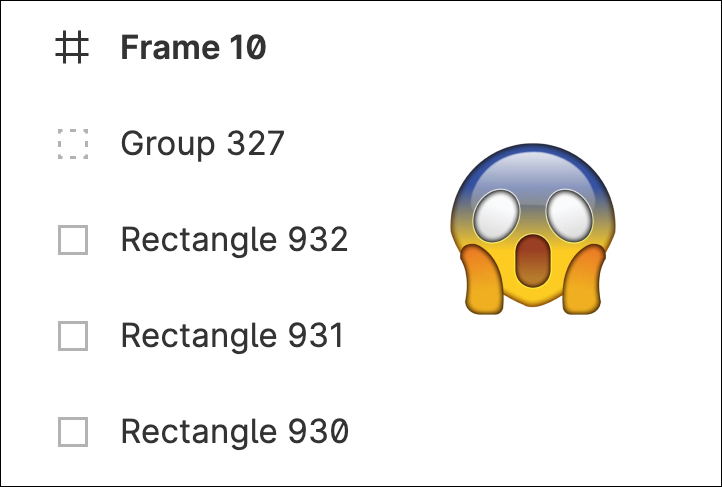
A scared emoji, over Figma's layers panel, looks horrified at the way layers are named.
A Figma migration, without the drama

A two year old boy, wearing a birthday party hat, sitting on the beach, cries, as someone approaches him with a cupcake - Photo by Nathan Dumlao on Unsplash
What follows is a set of notes and tips the UX+Fajitas community gathered over a couple of years, about switching from Sketch to Figma.
We've made the presentation deck available, to help the community make good decisions when moving teams to Figma.
It covers:
- Why Figma? Why now?
- DesignOps for Figma
- Plugins for efficient teams
- Project Workflow
- Pro-tips
- Figma Branching
- Bridging Design and Development
- Distributed Design
About the drawing
The drawing for this piece was generated, not chosen. Hashing the piece’s name fixes one point on the color wheel; the other two follow from it. The same name always gives the same three colors.
#4e4696#be985b#7a9337The line under the drawing marked “Meant to show” is written by a person, not the model. A generated drawing keeps what is large and loses what is small, so the detail that decides who someone is can go missing, and a picture only reaches people who can see it. Where the drawing and that line disagree, the line is the intent.
Or press ←the left arrow and →the right arrow.